Real-Time Status Tracker
Status Tracker in Staging helps you understand the progress of your building's modeled data as it moves from discovery to live streaming in Onboard.
While Onboard’s AI automatically labels points & equipment type, the final step of reviewing the AI predictions, validating, and publishing requires human confirmation. The Status Tracker guides you through this last mile by clearly showing what’s ready, what needs attention, and what has already been published.
At a glance, you can identify whether your data is:
- New and untouched
- Fully published & marked for live streaming
- Updated and waiting to be re-published
- Blocked by validation issues
This removes guesswork and gives you confidence that only clean, high-quality data is pushed live.
Where to Find the Status Tracker
You will find the Status Tracker in the Status column of the Staging tool. Each row whether it represents a point or an equipment includes a status icon. Hovering over the icon reveals a short explanation of what the status means and what action (if any) is required.
The Status column updates in real-time and reflects the current state of your model.
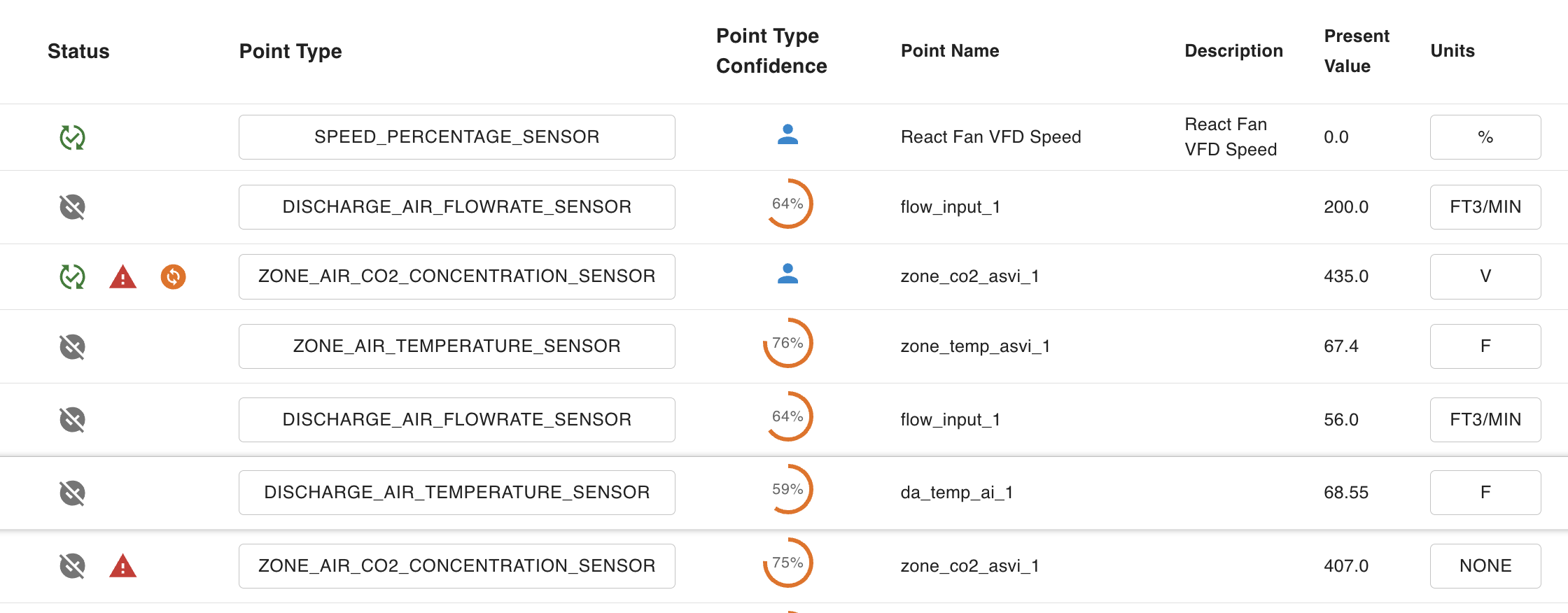
Understanding Status Icons
Each icon communicates both state and next step. Here’s what each one means:
Grey Circle - New
The point or equipment has been staged but has not yet been published.
What to do next: Review the labels and configuration. Publish when ready.
Green Circle - Published
The point or equipment has been successfully published and is ready for live data streaming. Configuration is complete and validated.
What to do next: No action required. Hover over the icon to see when it was published.
Red Triangle - Validation Error
A data quality issue is preventing publishing. The validation system has detected an inconsistency, such as:
- A mismatch between point type and unit
- Missing equipment or point type labels
Example: A discharge_air_temperature_sensor paired with an On/Off unit will trigger a validation error.
What to do next: Hover over the icon to view the exact issue. Fix the error if you wish to publish.
Orange Circle - Modified Since Publish
The point or equipment was changed after it was last published. The live building (published data) is using an older version.
Common causes:
- Point type or unit was changed
- New information was received for the device or point
What to do next: Re-publish to push the latest configuration live.
Orange Triangle - Partially Published
The equipment is published, but one or more associated points are not. Only part of the equipment’s data is live.
What to do next: Review and publish the remaining points to complete the equipment model or remove the unpublished points associated with the equipment.