Onboard System Overview
This guide walks through the how your building’s data flows through Onboard: from devices at the edge, to AI modeling in the cloud, to insights delivered through the web app, exports, and APIs.
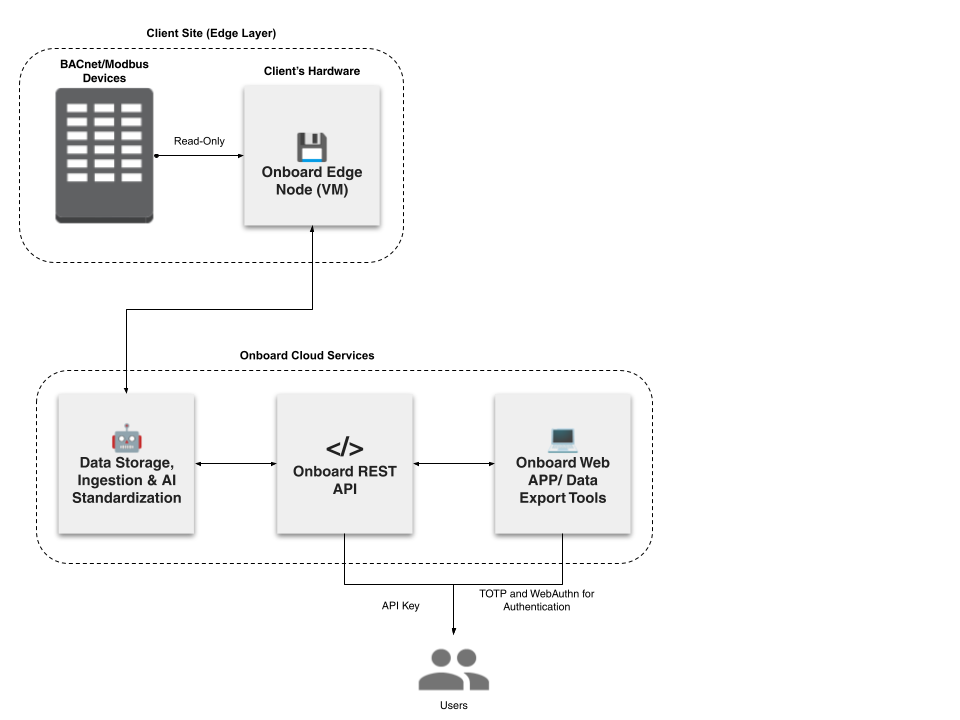
Below is a visual reference of the Onboard Workflow architecture, which we will walk through step-by-step:
If you do not have an Onboard account, lets first get you set-up, contact us to begin.
🧾 Pre-Installation Checks
Before installing Onboard’s software, it is important to confirm that your building and network environment are ready for data collection. Completing these checks upfront prevents installation delays, connectivity issues, and incomplete device discovery. Let's make sure you have reviewed all the necessary requirements carefully.
Installation Requirements
Review the minimum hardware and virtualization requirements for the Edge Software to run reliably.
🔗 View our Installation Requirements
Network & Connectivity Requirements
Check-in with your IT team to confirm they can meet the network requirements.
Verify with your Building's technician or BAS front-end to confirm that your BACnet or Modbus devices are accessible.
🔗 View our Network & Connectivity Requirements
🚀 Launch Your Project
Your onboarding journey begins here. Once you have reviewed all the requirements and you are ready to connect your building with Onboard, navigate to the Project Launcher in the Onboard APP.
Here, you will:
- Enter project and building details
- Confirm Data Sources: BACnet And/Or Modbus
- Confirm compatibility against installation & connectivity requirements
- Upload any supporting documentation (drawings, schedules, network diagrams).These documents stay attached to the project so you can easily reference them in the future.
- Need more time to confirm all the details?
- No problem, you can save your project in the Onboard APP and come back to complete it later
- Submit Project
- Submitting the project will generate an OVA file, and you will receive this via email to install onto your building's server to begin data collection
📥 Installation
Now you are ready to install Onboard’s Edge Software and start discovering and collecting data from all of your devices.
- Onboard will email you to download the Edge software installation file (OVA file)
- Deploy the OVA file with your VMware environment. For more information on deploying the OVA, see Installing Onboard's Edge Software.
- Power up the new VM using the VMware deployment wizard. Email support@onboarddata.io to confirm setup
- If you are deploying multiple VMs, please turn on one VM at a time. Check for a confirmation email us
- Confirm on the Onboard WebbAPP that the Edge node is active
After installation, the Edge node securely connects to your building network in read-only mode, discovering BACnet and Modbus devices (supported templates) and streaming metadata to Onboard Cloud Services.
🦾 AI Modeling (Staging)
Once connected, your building data begins flowing into Onboard’s cloud, where the AI-powered Staging Interface takes over. This takes anywhere between 3-4 hours.
What the AI Does
- Cleans and standardizes raw device data
- Predicts equipment types & point types, and assigns units
- Assigns confidence scores (so you know which labels are ready vs. need review)
- Generates top 5 prediction options
- Infers equipment relationships (e.g., AHU → VAV) using real telemetry (This takes upto 7 days after the relevant data is published and starts streaming)
Our AI dramatically reduces cognitive load on the user and shortens setup timelines.
🌍 Exploring the Data
Once published, your standardized building data will become available in the Buildings Explorer.
Here, you can:
- Monitor equipment performance in real time
- Compare trends across multiple buildings or systems
- Visualize sensor data over time
- Identify anomalies, drift, or inefficiencies quickly
The Explorer is designed for clarity and speed to allow you to navigate buildings, equipment, and points fluidly in a single, unified interface.
📥 Data Export
For deeper analysis or external workflows, you can extract data using Onboard’s Data Export tool.
The export tools allow you to:
- Query any equipment or point across any building
- Select custom time ranges
- Specify unit preferences, resampling rate or data aggregation preferences
- Retrieve data in CSV or JSON format
This is ideal for ad-hoc reports or building audits.
</> API & SDK
For customers building their own applications or automations, Onboard offers a full developer toolset.
REST API
Use the API to:
- Retrieve metadata (equipment, points, measurements)
- Query time-series values
- Integrate labeled building data into external platforms
Python and R SDKs
Designed for analytics and data science workflows, SDKs help you:
- Build dashboards
- Automate reporting
- Embed building insights into your own products
Onboard becomes your structured building data “backbone,” enabling rapid development without re-modeling or cleaning raw device data.
Data Alerts
Onboard includes a built-in alerting system to help you stay informed about the health of your building’s data. Data Alerts allow you to monitor key signals such as disruption in telemetry (stale data) or offline deployments so that you can take action before issues escalate.
Once its set-up, you will receive notifications when a building, equipment, or point stops trending or the Edge Node goes offline or loses connectivity
Putting It All Together
From your building devices → Edge Node → secure cloud ingestion → AI standardization → Explorer and Alerts → Data Export and APIs, the Onboard ecosystem delivers a fully integrated, end-to-end workflow. Each step works seamlessly together to ensure accurate data collection, a trusted standardized model, and fast access to insights.
Explore our Knowledgebase anytime to dive deeper into the specific modules that support your workflow.